
Whitepaper
Multi-million dollar SaaS knowledge base platform
Reduced its Azure spent by 48% in prod and 70% in non-prod subscriptions.

Kovai.co is a multi-product software company built to solve business problems, and Document360 is one of the fastest-growing products. In this paper, we will talk about some of the cost Intelligence challenges faced in operating Document360 with better profit margins, which is running on top of Microsoft Azure, and how Turbo360helps to optimize their Azure cost. Kovai.co is the parent company for both Document360 & Turbo360.
Business Need
As Document360 started acquiring enterprise customers at scale for years, the status quo of growth-at-all-cost was over, and the organization thrived towards striding the profit margins to keep the business healthy.
Like other SaaS businesses, the cloud Infrastructure cost is one of the significant cost drivers for Document360 after operational expenses like employee wages.
The organization strategically decided to cut down the cloud wastage and optimize the infrastructure to increase the profit margins. Also, they had plans to maximize the profit margins of enterprise customers based on their consumption at renewals and introducing a freemium plan to acquire more users.
Tracking key SaaS metrics like COGS only indicates something is going wrong while watching the margins shrink and does not provide meaningful context in improving the situation. It is essential to track the unit cost, like products, teams, and features which is being owned to reduce Azure Infrastructure cost and implement a show-back policy.
The Challenge
The key challenges fell into three main areas.
-
The actual Azure bill or native cost management tool provides a zoomed-out view of the cost per Azure service, which does not provide context like cost per feature or team to optimize Azure Infrastructure cost.
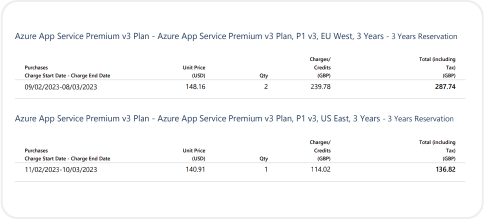
- They don’t have visibility into the cost per specific customer to maximize customer margins at renewal.
- There is no right cost recommendation and automation tools within the Azure portal to reduce the cost after figuring out the optimization areas.
Steps taken to reduce Azure Infrastructure cost
Document360 engineering team realized that a successful SaaS business would know if a particular release were efficient or bleeding money, and they take steps to fix it right away. Also, it is vital to understand if any existing feature was eating away the overall profits.
Why is it important to keep track of individual feature costs?
If you’re wondering how tracking the individual feature cost will help optimize cloud wastage, keep reading to learn more.
When using Azure cost management, you can view what you’ve spent in total and, over time, use that information to break the cost into environmental categories, for example, spending on production, development, and testing.
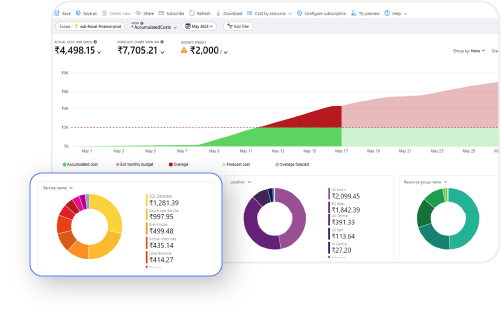
Note: In a few instances, the environmental or departmental cost can’t be separated easily when the resources are in multiple subscriptions and resource groups.
Now, what’s much more challenging is to break those categories down even further to see the finer details of the picture.
You could reasonably determine the production spend under the umbrella of the total sum, but it is also essential to understand which engineering choices are driving those costs. It could be the new features, resources used to build those features, and its choice of SKU hosting. Financial cost. Even indirectly. Just indirectly.
So, you need to adequately track cost at the feature level and determine if a feature is cost-effective from a revenue standpoint.
If you can’t even figure out how to isolate each feature and see them as disjointed pieces – you’ll never truly understand what’s driving your production costs.
Without understanding your production costs, you won’t know how to control, reduce, optimize, or manipulate the growth curve in your favor.
Why is it difficult to track the granular feature level cost in Azure?
The traditional way to associate cost with the individual feature is to tag the resources deployed to build the same. And if you get the tagging scheme exactly right the first time, you can get valuable information.
The challenge comes in real-time when you want to update those tags because you made a mistake or took a different direction and want to tag them differently.
-
The tagging must be consistent, and each team member must use the same syntax; this is often a challenge when onboarding new team members and being accessed by less experienced engineers.
- Typically, Azure resources that constitute a feature come from different Resource Groups and Subscriptions. In this scenario, you can’t determine the overall cost of a feature.
- In micro-service architecture, it is rare for a single piece of the resources to support only one feature. The resource could be SQL DB, where various features record their information. It is tough to tag these resources effectively.
After all, the time an engineering team could spend developing new revenue-producing features would be wasted having those employees tag, retag, and update old tags. Over time, that can result in a considerable financial cost, even indirectly.
The Solution and Result
How did they optimize Infrastructure cost with feature-level cost visibility?
Turbo360allows tracking the unit level cost like Teams, Products, Features, and more dimensions that make sense to your business.
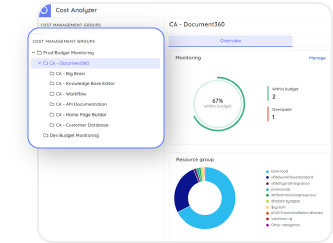
Soon, they realized a few features like Reusable content snippet, Search Analytics, and AI tag recommender was costing too much to their business.
The cost information was passed on to the engineering team, who owns the feature, and asked to address the potential problem areas and take necessary action.
Turbo360’s cost optimization module allows the engineering team to pinpoint the root cause of the cost spike.
Assisting Engineering team in Cost analysis
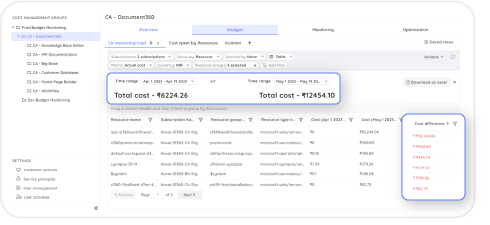
One of the traditional challenges of not being able to group Azure services from multiple subscriptions was addressed by Turbo360. Once the engineer hops into a particular scope (Unit cost of a team or feature) , he will be able to clearly see the total cost of the unit and the highest cost-consuming component down to the resource level.
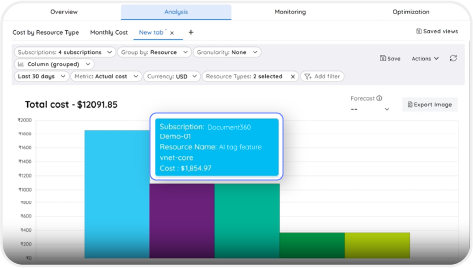
There are advanced filters that can be used to identify the potential cost difference between time intervals. Typically, it is done manually, but with out-of-the-box capabilities, you can get the answers in minutes.
The key tactical decisions taken to optimize cost
- Firstly, they noticed that several Azure Services like Azure VMs, App Service and SQL databases were over-provisioned on the premium tier. With the rightsizing recommendation from Turbo360, the engineers pinpointed the resources and took appropriate action to reduce the cost.
- Based on the resource utilization, Turbo360suggested purchasing the Reserved Instance for App Service plan and VMs, which saved a significant cost.
- In their environment, they found several idle resources that were provisioned were left ununsed for longer time. Based on the Azure cost wastage recommendation, those resources were deleted or reallocated to save cost.
- The VMs, App Services and Databases were optimized in non-prod to save cost. Given in non-production environment, those resources might not always need to be enabled after business hours; the automation schedules in Turbo360are used to auto-start and stop those resources to save cost.
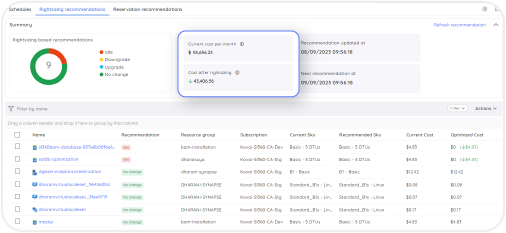
Potential Savings Realized: 26%
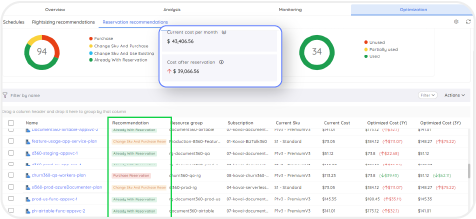
Potential Savings Realized: 10%
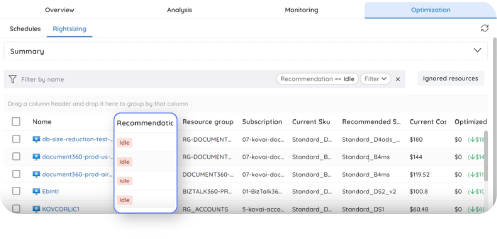
Potential Savings Realized: 10%
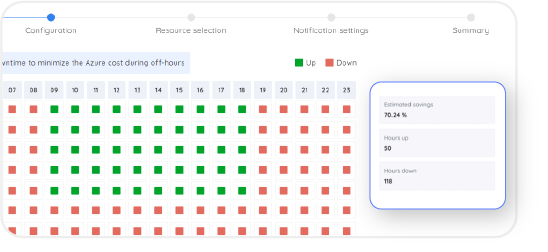
Potential Savings Realized: 70% in non-production
The key strategic decision taken to maximize margins
Document360 pricing was based on multi-tier pricing containing Standard, Professional, Business, and Enterprise.
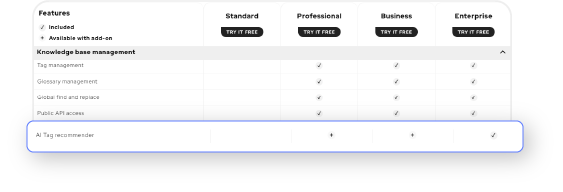
The Search Analytics and AI tag recommender features were a part of the Standard tier plan. After the cost insights, they restructured the pricing by moving those features to a higher pricing tier, Professional, to improve profit margins.
How did they maximize profit margins with large accounts?
Document360’s homegrown cost management tools, built with a combination of Azure native tools, aren’t cutting it.
When the Engineering leader was asked questions about the cost by other teams like finance and product managers who make decisions about product strategy and pricing, he would probably spend eight to twelve hours a week digging into the data and taking different slices that constitute a total cost to support a customer.
With Azure cost management, the cost per customer was opaque to the teams responsible for managing them.
Turbo360provides insights into cost per customer with cost scope capability. Now, the project managers and financial planning team get regular reports that have the cost to support specific customers. With that information, they approached the renewal process more intelligently and negotiated pricing to maximize the margins.
How did it help in designing their Freemium tier?
The unit cost intelligence also helped them make crucial business decisions to stay competitive in the market.
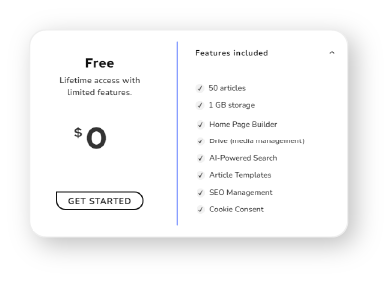
While many of their competitors had the option of a Freemium plan to attract more prospects, the marketing team had a proposal to introduce the freemium plan. However, the revenue team wants to know the cost impact and the features they could add to the plan that don’t affect the bottom line. With the cost intelligence down to feature level, they were able to project the expected Azure Infra cost and arrive at the features to be present in Freemium plan.
On-going cost visibility and monitoring
Turbo360not only helps in identifying potential cost saving opportunities and visibility into Azure bill, it excels in monitoring unit cost data and monitoring the same for an ongoing management.
You can set up budget alerts and give the engineering team constant feedback to see how their decision impact company bottom line, the revenue.
Enterprise-grade security
Have peace of mind that your company's data is fully secure and compliant with the latest industry standard certifications.